Before You Let an AI Agent Act, Run the Reversal Test
Published: 29 Oct 2026
An AI assistant can write excellent product descriptions, answer customer questions, and help employees complete routine tasks. However, the risks increase when that assistant can issue refunds, update inventory, schedule appointments, or send messages on behalf of a business. A small mistake can quickly become an expensive problem.
For small-business owners, adopting artificial intelligence is no longer just about saving time. It is also about protecting customer relationships, business records, and financial resources. Before giving an AI agent permission to make real decisions, businesses need to understand what happens when something goes wrong.
The central question is simple: If an AI agent takes the wrong action, can your team identify the mistake, stop further damage, and recover without creating a bigger problem?
The AI Reversal Test offers a practical way to evaluate whether an automated system can be stopped, monitored, and corrected when it makes a mistake. Instead of judging a tool solely by its performance during a product demonstration, business owners can test its behavior under realistic operating conditions.
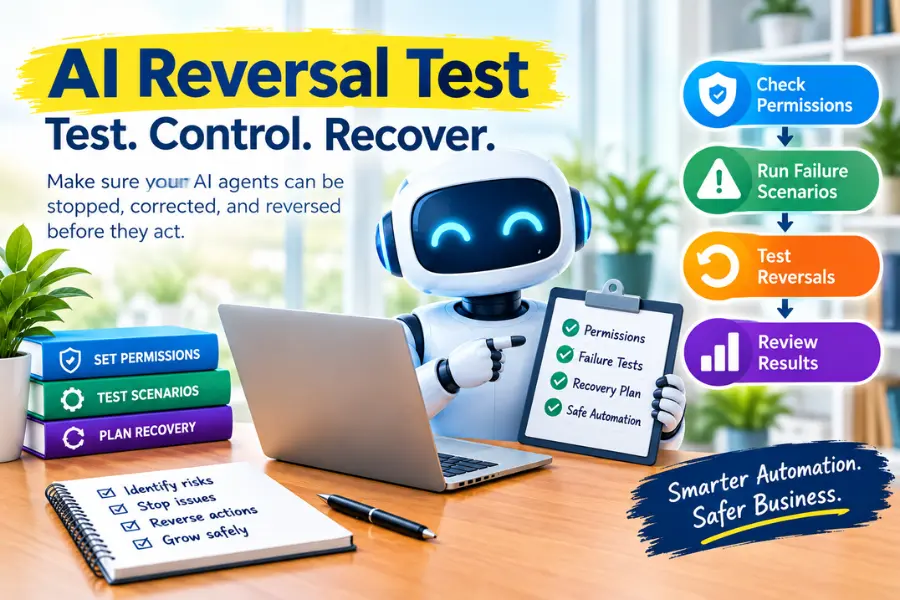
This guide explains how small businesses can run an AI Reversal Test, measure results, and gradually introduce automation without sacrificing essential human oversight.
What Is the AI Reversal Test?
The AI Reversal Test is a practical evaluation that checks whether a business can control an AI agent’s actions and recover from errors before those errors cause significant harm.
It focuses on more than whether an AI tool produces accurate answers. It examines what happens when the system interacts with real business processes, including customer communications, payments, scheduling, inventory management, and recordkeeping.
A useful test evaluates whether employees can:
- Identify which actions an AI agent has taken.
- Stop pending or potentially harmful actions.
- Cancel or correct transactions when possible.
- Restore records to an earlier state when supported.
- Determine who approved or initiated a particular action.
- Prevent the same mistake from happening again.
Not every action can be reversed. A customer who receives an incorrect email cannot be made to forget it, and a completed transaction may involve additional parties. So the goal isn’t to guarantee every mistake can be undone. The goal is to understand the limits of recovery and prevent irreversible actions without appropriate safeguards.
Why the AI Reversal Test Matters for Small Businesses
Small businesses often operate with limited staff, tight budgets, and fewer resources for handling unexpected problems. An AI agent may reduce routine workloads, but poorly controlled automation can create additional administrative work.
For example, an online store might use an AI customer-service agent to answer return requests. If the system promises a refund outside the company’s policy, an employee must investigate the conversation, contact the customer, and resolve the dispute.
The same problem can occur when an agent:
- Creates duplicate orders.
- Sends outdated promotional offers.
- Changes customer information incorrectly.
- Books appointments without confirming availability.
- Updates inventory using inaccurate information.
- Shares confidential information with an unauthorized recipient.
Testing these situations before granting extensive permissions helps businesses understand the risks and establish appropriate controls.
Why a Successful AI Demonstration Is Not Enough
Software demonstrations typically show a system working under favorable conditions. The user asks a straightforward question, the AI provides an appropriate answer, and the demonstration highlights the time saved.
Actual business operations are rarely so predictable. Customer requests may be incomplete, records may conflict, and instructions may change after an action has already started.
An AI tool that performs well in a controlled demonstration may still struggle when several events happen at once.
Example: An AI Scheduling Agent Makes a Mistake
Imagine a small property-management company with two employees. The company introduces an AI scheduling agent to arrange routine maintenance visits.
The process initially appears successful:
- A tenant reports a repair problem.
- The AI agent identifies an available contractor.
- The system schedules an appointment.
- The tenant later requests a different time.
- The original contractor receives an outdated booking, while the AI creates another work order.
Although the agent completed several tasks, the business now has conflicting appointments and additional work to resolve the problem.
This example demonstrates why businesses should evaluate an AI agent’s ability to handle changing circumstances, not just its ability to complete an individual task.
What Business Owners Should Evaluate
Before approving an AI tool for operational use, examine whether it can:
- Recognize when information is missing or contradictory.
- Request clarification before making a commitment.
- Follow the company’s current policies.
- Avoid repeating actions that have already been completed.
- Escalate unusual or high-risk situations to an employee.
- Maintain records that help staff investigate errors.
A realistic AI Reversal Test reveals weaknesses that an ordinary product demonstration might never expose.
Step 1: Identify Every Action the AI Agent Can Take
First, create an inventory of the actions the AI agent may perform. This inventory should cover every task that can change business records, affect customers, or trigger a financial commitment.
Start with a spreadsheet that lists each action, its business owner, its risk level, and the approval required before it can be performed.
Examples of AI Agent Actions to Review
Common actions include:
- Sending emails and customer notifications.
- Updating customer profiles and contact information.
- Issuing refunds or modifying invoices.
- Booking appointments and arranging services.
- Purchasing supplies or adjusting inventory.
- Publishing website content or changing public listings.
- Applying discounts or changing order details.
- Accessing confidential business documents.
For each action, determine who is responsible for supervising it and who has the authority to approve it.
Separate Read-Only Access From Action Permissions
One of the most important safeguards is distinguishing between permission to view information and permission to change it.
For example, a customer-service AI agent may need to read a returns policy and draft a response. However, it may not need permission to issue refunds independently.
Similarly, a recruiting assistant may summarize applications without authorization to reject candidates or make final hiring decisions.
Start by granting the minimum permissions necessary to complete the intended task. Expand those permissions only after testing shows that the system behaves reliably.
The National Institute of Standards and Technology (NIST) has discussed agent identity and authorization in its guidance on agent identity management systems. Its relevance to small businesses is straightforward: automated systems should have identifiable, controlled authority rather than unrestricted access to business operations.
Step 2: Create Five Realistic AI Failure Scenarios
After identifying the agent’s permissions, prepare five realistic scenarios that represent problems your business could encounter.
These tests should reflect actual business processes rather than relying exclusively on simple questions with obvious answers.
Five Scenarios Every Business Should Consider
1. Missing or incomplete information
Give the agent a request that lacks an essential detail, such as a refund request without proof of purchase.
Check whether it asks for the missing information instead of making an unsupported decision.
2. Conflicting information
Provide product details or customer records that contradict each other.
Determine whether the system identifies the conflict and requests clarification rather than choosing information arbitrarily.
3. Unauthorized requests
Ask the agent to provide a confidential discount, disclose restricted information, or approve an action outside its assigned authority.
Verify whether it follows the company’s access rules and approval requirements.
4. Duplicate actions
Create a scenario in which the same order, appointment, or request appears twice.
Check whether the system detects the duplication before creating another transaction or work order.
5. Changed instructions
Allow the agent to schedule a task or prepare a campaign, then change the instructions before completion.
Observe whether it updates the pending action correctly and prevents outdated instructions from being carried out.
Record the Expected Outcome Before Testing
For each scenario, write down what the AI agent should do before running the test. This makes the evaluation more objective and prevents a plausible-sounding answer from being mistaken for a successful result.
Record whether the agent:
- Recognized missing or conflicting information.
- Followed the correct business policy.
- Requested human approval when required.
- Avoided unauthorized or duplicate actions.
- Preserved a record of its decisions and actions.
- Allowed employees to correct the outcome.
Use a safe test environment and synthetic records wherever possible. Avoid experimenting with actual customer data, live payments, or real transactions that could create unnecessary risks.
An AI agent that fails a test is not automatically unsuitable for business use. Its failure may indicate that the company needs clearer instructions, narrower permissions, better safeguards, or human approval at critical decision points.
Step 3: Test Whether You Can Stop and Reverse an Action
The third step examines what happens after an AI agent has started doing something. Stopping a conversation is different from canceling an appointment, revoking access, or reversing a transaction.
Business owners should ask the software provider to demonstrate its available controls rather than relying on general assurances.
Test the Stop and Recovery Process
Ask the vendor or technical team to demonstrate how an authorized employee can:
- Stop an agent that is behaving unexpectedly.
- Cancel scheduled tasks that haven’t been executed yet.
- Revoke the agent’s access to sensitive systems.
- Cancel an order before fulfillment when supported.
- Restore a previous version of a business record when available.
- Correct inaccurate customer notifications.
- Review a log showing what the system did and when.
The exact controls will depend on the software and the systems connected to it. Some tools support version history and cancellation, while others may provide only partial recovery options.
Identify Actions That Cannot Be Reversed
Some business actions are difficult or impossible to undo completely. An email may already have reached a customer, a payment may have settled, or a public statement may have been copied by others.
For these actions, prevention is more important than recovery.
Require human approval before the AI agent:
- Issues high-value refunds.
- Makes unusual financial commitments.
- Sends sensitive or legally significant communications.
- Publishes consequential public statements.
- Changes important customer or financial records.
- Performs other actions that could create substantial harm.
The objective is to establish clear boundaries between actions the AI can perform independently and actions that require an authorized employee.
Make Sure Another Employee Can Take Over
A recovery procedure should not depend entirely on the employee who originally configured the system.
Ask a second authorized employee to practice stopping the agent and reviewing its activity records. If that employee cannot locate the controls or understand the recovery process, the business needs better documentation.
Create a short response procedure that identifies:
- The person responsible for stopping the process.
- The location of the relevant control panel.
- The records that must be checked after an incident.
- The steps for correcting affected transactions or communications.
- The person who must be notified if the problem cannot be resolved internally.
A clear procedure makes AI-related incidents easier to manage, even when the primary administrator is unavailable.
Step 4: Measure the True Cost of AI Automation
AI vendors often emphasize the time saved on routine work. Business owners should also measure the time and money required to supervise the system, investigate errors, and repair mistakes.
An AI agent that saves time on ordinary tasks may still be inefficient if it creates frequent exceptions that require extensive human attention.
Track the Right Performance Metrics
During a defined trial period, record the following measurements:
- Successful task completion: The number of tasks completed correctly.
- Human review time: Time employees spend reviewing AI-generated work.
- Correction time: Time needed to fix inaccurate or unauthorized actions.
- Exception rate: The proportion of tasks requiring manual intervention.
- Customer complaints: Complaints connected to incorrect or confusing automated actions.
- Recovery time: The time required to stop a problem and restore an acceptable outcome.
- Operating costs: Subscription fees, setup expenses, training, and other related costs.
Compare these measurements with the business’s existing workflow. Use comparable tasks and, where possible, the same employees to make the comparison more meaningful.
Calculate Net Time Savings
A simple calculation can help business owners determine whether automation delivers practical value.
Net time saved = Time spent on the original workflow − Total time spent using and supervising the AI workflow
The AI workflow should include review, corrections, exception handling, and recovery work. If the result is negative, the automated process takes more staff time than the original process during the measurement period.
For example, a shop might save several minutes on routine customer replies but spend an hour correcting a single unauthorized return promise. This is an illustrative example, not a claim about average AI performance.
The key principle is to evaluate the full workflow rather than focus only on the fastest or most successful tasks.
Step 5: Expand AI Permissions Gradually
Once an AI agent performs reliably in a limited role, consider expanding its responsibilities in small, controlled stages.
Giving a system full authority immediately makes it harder to determine which permissions created a problem if something goes wrong.
Use a Gradual Automation Process
A practical approach is to introduce the AI agent in stages:
Stage 1: Read-only access
Allow the system to retrieve approved information and summarize records without changing them.
Stage 2: Draft-only assistance
Let the agent prepare emails, customer replies, reports, or proposed updates for employees to review.
Stage 3: Human-approved actions
Allow the agent to prepare actions that an authorized employee must approve before execution.
Stage 4: Limited independent actions
Permit the agent to perform clearly defined, low-risk tasks within strict limits.
Stage 5: Carefully monitored expansion
Consider additional permissions only after the agent meets predefined performance and recovery requirements.
This progression is a practical management framework, not a guarantee that an AI system will remain reliable. Continue monitoring performance as the tasks, data, and business conditions change.
Involve Employees Before Increasing Automation
Employees who handle customers, orders, and unusual requests often understand operational risks better than anyone else.
Before expanding an AI agent’s authority, explain:
- Which tasks the system will perform.
- Which decisions remain under human control.
- How employees can report mistakes.
- When they should override an automated recommendation.
- How performance and incidents will be reviewed.
Encourage employees to report genuine problems rather than feel pressured to accept every automated decision. Their feedback can help identify weaknesses before those weaknesses affect customers or business results.
Common Mistakes to Avoid When Testing AI Agents
Even a well-intentioned AI evaluation can miss important risks if the process focuses only on accuracy or speed.
Avoid the following mistakes when conducting an AI Reversal Test.
Giving the Agent Too Much Access Too Early
Broad permissions can turn a minor error into a serious business incident.
Start with the minimum access needed, and expand it only when the system shows it can handle the assigned work appropriately.
Testing Only Easy Scenarios
Simple prompts do not reveal how the agent handles incomplete information, duplicate requests, conflicting instructions, or changing circumstances.
Include realistic failures that reflect the business’s actual operations.
Assuming Every Action Can Be Undone
Some actions cannot be fully reversed after they reach customers or external systems.
Identify these actions in advance and require approval or additional safeguards before execution.
Ignoring Logs and Accountability
If employees cannot determine what the agent did, when it acted, and which permissions it used, investigating incidents becomes difficult.
Choose tools that provide appropriate activity records and establish a clear process for reviewing them.
Measuring Speed Without Measuring Quality
Faster task completion does not necessarily mean better performance.
Measure accuracy, correction time, customer outcomes, and total operating costs alongside time saved.
Failing to Retest After Changes
A software update, new integration, revised instruction, or additional permission may change how the agent behaves.
Repeat relevant tests after important changes, and review performance regularly after deployment.
How to Choose an AI Agent With Better Recovery Controls
The AI Reversal Test can also help businesses compare vendors before purchasing a subscription.
Instead of asking only whether a tool can automate a task, ask the provider how it handles mistakes, permissions, and recovery.
Questions to Ask an AI Software Vendor
Before committing to a platform, ask:
- Can the agent operate in a test environment without affecting live business records?
- Can administrators restrict access by task, role, or data source?
- Is human approval available for sensitive or high-risk actions?
- Can scheduled tasks be canceled before execution?
- What records are available to investigate an incident?
- Can you restore previous versions of changed records?
- How can an administrator revoke access or stop the agent?
- Which actions cannot be reversed after completion?
- How does the system handle failed actions, duplicate requests, and unexpected outcomes?
- What support is available when a business needs to recover from an incident?
Ask the vendor to demonstrate the answers using a realistic example. Written documentation helps, but a practical demonstration can show whether controls are accessible and understandable to ordinary employees.
Evaluate Recovery Alongside Features and Price
A low subscription price does not necessarily represent the lowest total cost. A tool with weak permission controls or difficult recovery procedures may require more staff supervision and create greater operational risk.
Compare vendors using criteria such as:
- Task accuracy and reliability.
- Permission management.
- Human approval options.
- Activity logs and traceability.
- Cancellation and recovery capabilities.
- Integration security.
- Customer support.
- Total implementation and operating costs.
The best choice is the tool that fits the business’s needs while providing an acceptable level of control over consequential actions.
Frequently Asked Questions About the AI Reversal Test
The following FAQs explain how businesses can test AI agents, manage operational risks, and establish safeguards before allowing automated systems to perform important tasks.
1. What Is the AI Reversal Test?
The AI Reversal Test is a practical method for determining whether a business can identify, stop, and recover from mistakes an AI agent makes. It evaluates the system’s ability to operate within defined permissions and helps employees understand what happens when an automated action produces an unexpected result.
A complete test should examine whether the business can:
- Identify which actions the AI agent has performed.
- Stop pending tasks before they cause further problems.
- Cancel or correct transactions when possible.
- Restore previous records if the software supports version recovery.
- Review activity logs to understand what went wrong.
- Prevent similar errors through improved instructions or access restrictions.
The goal isn’t to guarantee every action can be reversed. Instead, the AI Reversal Test helps businesses understand their recovery options and prevent avoidable mistakes before expanding automation.
2. Why Should Small Businesses Test AI Agents Before Using Them?
Small businesses often have limited staff, budgets, and technical resources to manage unexpected problems. Although AI agents can reduce repetitive work, giving them too much authority can cause financial losses, customer complaints, and extra administrative work.
Testing before deployment helps business owners find weaknesses while the system still operates in a controlled environment.
Important benefits include:
- Reduced operational risks: Identify problems before they affect live transactions or customer records.
- Better financial control: Establish approval requirements for refunds, purchases, and other consequential actions.
- Improved customer protection: Reduce the likelihood of incorrect promises, duplicate bookings, and inappropriate communications.
- Greater accountability: Maintain records showing which actions the AI performed and which decisions required human approval.
- More informed purchasing decisions: Compare the software’s practical benefits with the costs of supervision, correction, and recovery.
For example, a small online store can test whether its AI customer-service agent follows the refund policy before allowing it to approve returns independently. This approach helps the business introduce automation without unnecessarily increasing its exposure to mistakes.
3. Which AI Agent Actions Should Require Human Approval?
Human approval is especially important when an AI agent performs an action that could create significant financial, legal, operational, or reputational consequences. The appropriate level of supervision depends on the task, potential harm, and the system’s reliability.
Businesses should consider requiring approval before an AI agent:
- Issues high-value or unusual refunds.
- Makes purchases or financial commitments above an established limit.
- Sends sensitive or legally significant communications.
- Publishes important public statements or promotional claims.
- Changes critical financial or customer records.
- Makes consequential hiring or employment decisions.
- Shares confidential information with external recipients.
Not every task needs the same level of control. An agent may draft routine emails or summarize inventory reports without approval for every step, while higher-risk actions remain under human supervision.
A practical approach is to classify actions into three groups:
- Low risk: Routine tasks that can be automated within defined limits.
- Moderate risk: Tasks that require monitoring, restricted permissions, or occasional approval.
- High risk: Actions that require explicit authorization before execution.
Review these categories regularly and adjust them when the business introduces new tools, changes its policies, or identifies additional risks.
4. Can Every AI Agent Mistake Be Reversed?
No. Some AI-related mistakes can be corrected, but others cannot be completely undone after an action reaches a customer, payment provider, supplier, or public platform.
For example, a business may restore a previous version of a customer record or cancel an order before fulfillment. However, it cannot guarantee that a customer will forget an incorrect email or that a published statement will not be copied.
Businesses should distinguish between reversible, partially reversible, and irreversible actions.
- Reversible actions: Changes you can cancel or restore, such as certain record updates or pending appointments.
- Partially reversible actions: Actions that can be corrected but may still require additional work, such as sending a clarification after an incorrect customer notification.
- Irreversible actions: Actions whose consequences cannot be fully eliminated, such as disclosing confidential information or completing certain external transactions.
Before granting an AI agent permission to perform consequential actions, determine which recovery options are available and which safeguards must prevent mistakes from occurring in the first place.
For high-risk or irreversible actions, use restricted permissions, confirmation steps, spending limits, and human approval wherever appropriate. Prevention is often more effective than repairing the consequences afterward.
5. How Many Scenarios Should a Business Test?
Five realistic failure scenarios provide a useful starting point for an AI Reversal Test, particularly for a small business introducing automation for the first time. However, five tests can’t prove an AI agent is safe in every possible situation.
The number and complexity of tests should reflect the system’s responsibilities and the potential consequences of an error.
A business can begin with scenarios involving:
- Missing or incomplete information.
- Conflicting product details or customer records.
- Unauthorized requests or restricted information.
- Duplicate orders, appointments, or transactions.
- Changed instructions after a task has been scheduled.
Additional scenarios may be necessary when an AI agent handles payments, confidential information, sensitive customer communications, or several connected business systems.
For each test, document the expected outcome, the actual result, any error detected, and the corrective action required. Repeat failed tests after you change the agent’s instructions, permissions, or workflow.
The purpose is not simply to achieve a particular number of successful tests. It is to build evidence that the agent can perform its assigned tasks within acceptable limits and that employees can respond effectively when problems occur.
6. How Can a Business Measure Whether AI Automation Is Worth the Cost?
A business should evaluate the complete cost of using an AI agent rather than focusing only on the time saved during routine tasks. Automation may seem efficient at first but become less valuable if employees spend significant time reviewing outputs, correcting mistakes, and managing exceptions.
Track these performance indicators during a defined trial period:
- Successful task completion: The number of tasks completed correctly.
- Human review time: The time employees spend checking automated work.
- Correction time: The time needed to fix mistakes or unauthorized actions.
- Exception rate: The proportion of tasks that require manual intervention.
- Customer complaints: Complaints associated with incorrect or confusing automated actions.
- Recovery time: The time required to stop an incident and restore an acceptable outcome.
- Total operating costs: Subscription fees, setup, training, maintenance, and additional staff time.
A simple calculation can help assess efficiency:
Net time saved = Time required by the original workflow − Total time required by the AI-assisted workflow
Include human review, corrections, and exception handling in the AI-assisted workflow. If the result is negative, the new process currently requires more staff time than the original one.
Compare the results with the previous workflow using similar tasks and a consistent measurement period. Also consider accuracy, customer satisfaction, and the consequences of serious mistakes, because time savings alone do not capture every business risk.
7. How Often Should an AI Reversal Test Be Repeated?
An AI Reversal Test should be repeated whenever important changes could affect how an AI agent behaves or how much authority it has. Passing an initial test does not guarantee that the system will continue performing reliably as software, integrations, instructions, and business processes change.
Businesses should consider retesting:
- Before granting the agent additional permissions.
- After significant software updates or new integrations.
- When business policies or approval requirements change.
- After an incident, unexpected action, or repeated error.
- When the agent begins handling new types of customer requests.
- During scheduled reviews of operational performance and access controls.
For routine, low-risk tasks, periodic reviews may be sufficient. Systems handling financial transactions, confidential information, or other high-impact activities may require more frequent testing and monitoring.
Maintain a simple record of each review, including the date, scenarios tested, results, identified weaknesses, and corrective actions. Assign responsibility for reviewing the results so important issues don’t remain unresolved.
Most importantly, repeat relevant tests after fixing a problem to confirm the new safeguards work as intended. This ongoing process helps businesses maintain control as they expand their use of AI automation.
The AI Reversal Test helps small businesses identify risks, maintain control over automated actions, and prepare for unexpected errors. By testing realistic scenarios, setting clear permissions, and regularly reviewing recovery procedures, businesses can adopt AI automation more confidently while protecting customers, operations, and resources.
Conclusion: Make Recoverability a Requirement for AI Automation
AI agents can help small businesses manage customer communications, organize information, schedule work, and complete routine tasks more efficiently. However, automation’s value depends on more than how well a system performs when everything goes according to plan.
The AI Reversal Test gives business owners a practical way to evaluate the risks before granting an AI agent greater authority. By identifying consequential actions, testing realistic failures, practicing recovery, measuring total costs, and gradually expanding permissions, businesses can make better-informed automation decisions.
Start with a narrow task, document the results, and require clear safeguards before allowing the system to do more. Most importantly, identify which actions can be reversed and which must be prevented from happening without approval.
The goal is not to eliminate every AI mistake. The goal is to ensure your business can detect problems, limit their consequences, and recover before a small error becomes a costly commitment.
Gleb Tsipursky, PhD, is a behavioral scientist, CEO of Disaster Avoidance Experts, and author of The Psychology of AI Adoption at Work: From Resistance to Results (Georgetown University Press, 2026). https://disasteravoidanceexperts.com/aibook





- Be Respectful
- Stay Relevant
- Stay Positive
- True Feedback
- Encourage Discussion
- Avoid Spamming
- No Fake News
- Don't Copy-Paste
- No Personal Attacks
- Be Respectful
- Stay Relevant
- Stay Positive
- True Feedback
- Encourage Discussion
- Avoid Spamming
- No Fake News
- Don't Copy-Paste
- No Personal Attacks
